What you need
- MetaTrader 5 desktop — the free terminal from metatrader5.com or your broker. The mobile apps cannot run the Strategy Tester.
- A broker login with XAUUSD — a free demo account is enough. Ideally the same broker you plan to trade with, quoting gold with two decimals.
- A free MQL5.com account, which MetaTrader 5 uses to download Market products.
- A preset — download one from the set files page. Balanced is the sensible first test.
Step-by-step
- 1
Sign MetaTrader 5 in to MQL5
In the terminal open Tools → Options → Community, enter your MQL5 login and password, and press OK. - 2
Download the free demo
Open the Philippe Calibre 79 product page and click Free Demo — MQL5 hands the download to your terminal. You can also search for the product in the Market tab of the terminal's Toolbox. The demo appears under Navigator → Expert Advisors → Market. - 3
Open the Strategy Tester
Press Ctrl+R (or View → Strategy Tester) and choose a single test. - 4
Configure the Settings tab
Expert: Philippe Calibre 79 Gold from the Market folder. Symbol: your broker's XAUUSD. Timeframe: any — the EA manages its timeframes internally. Date: at least one full year. Modelling: Every tick based on real ticks. Deposit and leverage: what you intend to trade with. - 5
Load a preset on the Inputs tab
Right-click inside the Inputs list, choose Load, and pick the .set file you downloaded. The Auto risk profile value should change to match the preset. - 6
Start and read the report
Press Start. When the run finishes, open the Backtest tab for the report and the Graph tab for the balance and equity curves.
The first run is slow — that's normal
Which numbers matter in the report
Philippe Calibre 79 uses a built-in basket closure mechanism to manage floating positions, so a trade can float in loss before the basket closes. That makes equity drawdown — which includes floating losses — the figure to judge, not balance drawdown and not win rate.
- Equity Drawdown Relative — the deepest percentage fall including open positions. Size your account so you could sit through this number, and more.
- Profit Factor — gross profit ÷ gross loss. Above 1.0 is profitable; compare presets on the same period rather than chasing a single high figure.
- Total Trades — more trades over a longer period give a more trustworthy picture.
- History Quality — shown at the top of the report. Low quality means gaps in the tick data, so treat those results with caution.
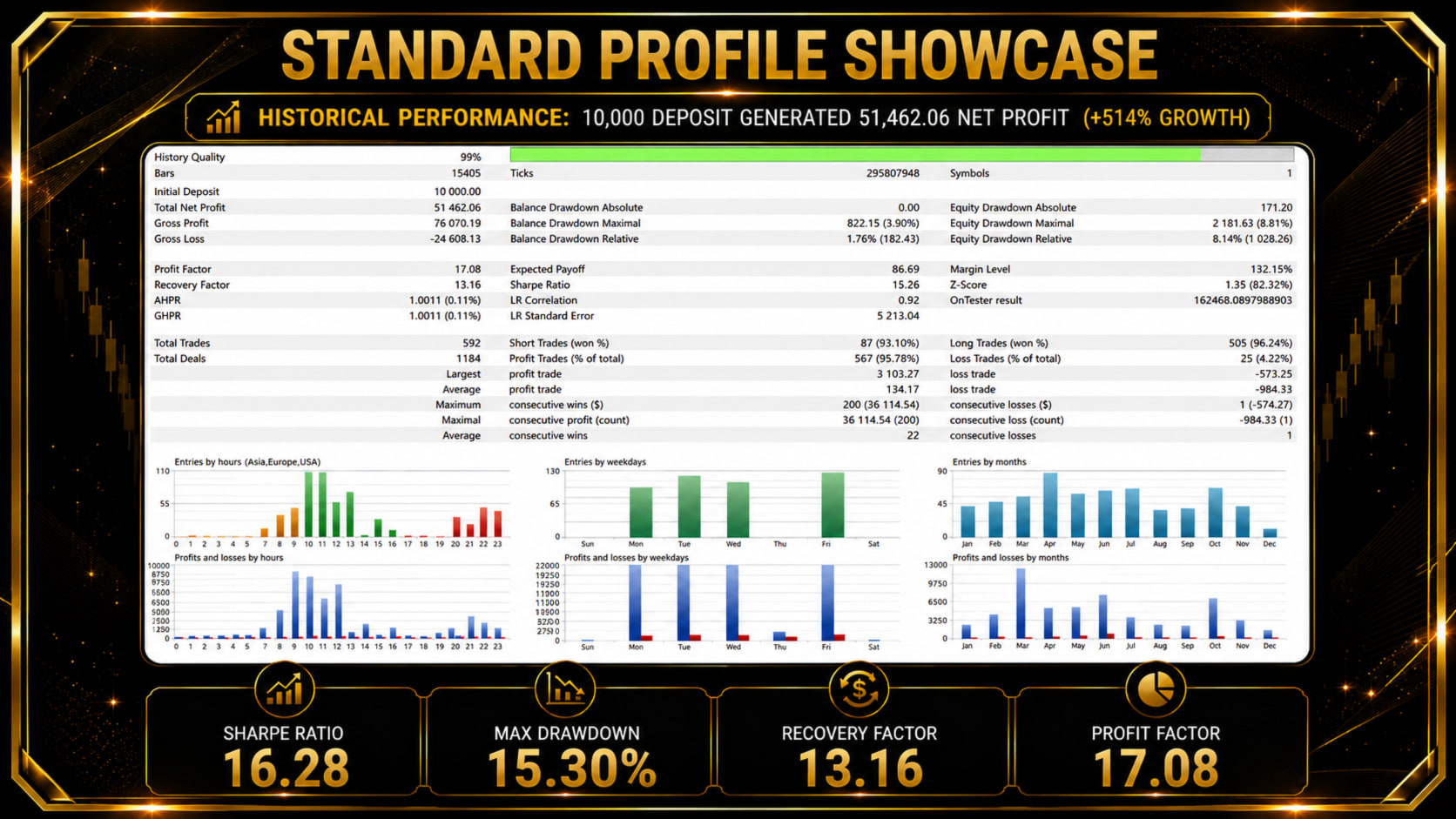
For reference, the developer's published backtest uses the Standard profile — the Balanced preset — on a $10,000 deposit at 99% modelling quality. Your broker's spreads, commission and tick data will produce different numbers, which is exactly why testing on your own feed is worth it.
Limits of a backtest
- No news filter in the tester. The MetaTrader 5 economic calendar is not available inside the Strategy Tester, so backtests run without news pauses. (The official presets ship with the news filter off anyway.)
- The demo only runs in the tester. MQL5 demo versions cannot trade a live or demo account — to forward-test on a demo account you need the purchased or rented version.
- History is not a forecast. A backtest shows how the logic handled past gold prices; it cannot promise the next year. Cross-check behaviour against the public live signals.
Try more than one preset
Run Balanced first, then repeat the same date range with a lower profile such as Conservative and a higher one such as Aggressive. Comparing equity drawdown across the three on identical data is the fastest way to find your comfort zone — the risk profile guide explains how to decide.
Happy with what you see? The installation guide covers buying or renting, installing and running the EA 24/5 on a VPS.